Linking the Past and Present
HOW I T WORKS
Linking the Past and Present allows students
to explore Shakespeare’s A Midsummer Night’s
Dream and state-of-the-art technology
simultaneously. Students learn to appreciate great
literary works and also learn the technological skills
that are in demand in digital production. Students initially attain the background of the
production through research. Discussions are
held on the life and times of William Shakespeare.
With this background, the students proceed to
digitally produce the play act by act. Students work in
groups of two or three. To ensure they are familiar with the subject, use
guided questions. You can create a web page
that posts specific questions and links to guide
students on the web, instead of asking students
to surf on their own. Inspiration software allows
students to graphically organize information.
Students read, critically analyze, and act out the
play. When they fully grasp all aspects of the
play, digital video production begins. Production is broken up into: Pre-production
(planning the character roles and assigning the
students behind-the-scene jobs. They
storyboard and cut out any acts or scenes they
aren't going to use); Production (shooting each
act scene by scene); and Post-production
(utilizing digital editing software to create a
consistent flow of the play as well as determining what
stays and what does not in the final product).
THE STUDENTS
About 150 students from the sixth, seventh, and
eighth grade participated in this program last
year. All of the classes work together as a
production studio would work. Each student had
an individual and important role. They come
together as one to produce a finished product.
The studio is filled with busy workers.
THE STAFF
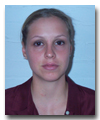
Maria Venier graduated from Brooklyn College
two years ago. She majored in TV/Radio
Production. After working for Bloomberg News,
the Prayer Channel, and WPLJ, she decided to
take her production skills into teaching. In her
first year, she used a camcorder and a simple
tape recorder and turned her classroom into a
room of creativity and imagination. As a result,
her students were quickly motivated and
interested in subjects such as Shakespeare.
WHAT YOU NEED
Teachers will need a PC or Mac with digital
audio/video editing software. The computers
should have access to the Internet. Students
can use either digital or analog camcorders.
Students will need a VCR and a monitor.
Teachers will need all sorts of cables and will need to
know how to hook up all the equipment together.
OVERALL VALUE
Nothing captures the imagination of students
like being able to view—first-hand—a product of
their own creation. The fact that they are
involved in every aspect, using top of the line
technologies, erases any fears they might have
had when confronted with advanced machines.
In this particular case, students have the ability
to discover William Shakespeare in a manner
that is fun. They gain an abundance of skills:
communicating, evaluating, investigating,
listening, perceiving, planning, presenting, prioritizing,
reading, summarizing, synthesizing, writing, and
self-assessing. |